
Your single best strategy for the GCSE calculator paper is to treat the calculator as a precision tool, never a substitute for method. Estimate before you press equals, enter numbers carefully, and write down your working every time. Do that consistently and you protect method marks even when a keystroke goes wrong.
TL;DR:
- Mastering consistent six-step routines, including estimating answers and checking units, helps prevent common calculation errors during the exam.
- Knowing the calculator’s functions, modes, and permitted features allows for efficient and error-free entry, especially brackets, Ans, and standard form keys.
- Proper input discipline, such as bracket use, correct mode, and clearing memory, significantly reduces avoidable mistakes like sign, bracket, or mode errors.
- Always estimate and sense-check answers before and after calculating to catch errors in sign, scale, or units early.
- Practicing with your actual calculator, reviewing previous mistakes, and following a structured revision plan improves accuracy and confidence for exam day.
Table of Contents
- What is the calculator paper strategy that works?
- Know your calculator: functions, modes, and permitted features
- Calculator input discipline and common button traps
- Estimation and sense-checking: quick checks before and after calculating
- Show your working and use the formula sheet effectively
- A practical practice plan: past papers, timed sections and error review
- Exam-day checklist and time management for the calculator paper
- How Mathvault supports this strategy
- Strategies for handling percentages, fractions, and standard form
- Techniques for double-checking final answers
- Tips for using memory and recall functions on the calculator
- Strategies for when calculator use is restricted or not allowed
- Common pitfalls specific to calculator functions and how to avoid them
- Author perspective: the one habit worth practising daily
- Where to practise: recommended MathVault packs and next steps
- Sources
- FAQ
What is the calculator paper strategy that works?
The strongest calculator paper strategy is a fixed six-step rhythm you repeat on every question so that it becomes automatic under exam pressure rather than something you have to think about each time.
- Read the question twice and underline what it’s actually asking for.
- Estimate the rough size and sign of the answer before touching a button.
- Choose your method first, deciding which formula or process fits.
- Enter carefully, using brackets and the Ans key rather than retyping numbers.
- Interpret the display; check units, decimal places and rounding instructions.
- Check your answer against your estimate before moving on.
This rhythm matters because most lost marks on the calculator paper come from skipping a step, not from not knowing the maths. Students who write a quick estimate, then check their final answer against it, catches a huge share of their own mistakes before the invigilator ever sees the paper.
Know your calculator: functions, modes, and permitted features
Every calculator paper strategy starts with knowing your own machine cold. Most GCSE students use a Casio fx-83GT or fx-991EX, and both reward students who master a handful of specific functions rather than trying to remember every button.
- Brackets for grouping operations, especially in fractions and multi-step formulae.
- Ans to carry a previous result forward without retyping it.
- Fraction-style input (the fraction key) to keep exact values instead of rounding early.
- Powers and roots, including the cube root and nth root keys, which many students overlook.
- Standard form entry (the ×10ⁿ key), essential for very large or small numbers.
- Trig keys, paired with a mode check every single time.
Before exam season, sit down and deliberately set your display mode and confirm it’s in degrees, not radians or gradians. Check your calculator model against your exam board’s approved list too. AQA, Edexcel, OCR and WJEC all follow JCQ guidance on permitted calculators, and a small number of graphical or programmable models are barred entirely.
Pro Tip: Practise on the exact calculator you’ll bring to the exam hall, not a spare or a phone app. Muscle memory for button positions saves real seconds under pressure.
Calculator input discipline and common button traps
Wrong mode, misplaced brackets and misused negative signs cause a disproportionate share of calculator-paper errors, and every one of them is avoidable with a bit of entry discipline.
- Bracket everything you’re unsure about. If a fraction has a multi-term numerator or denominator, bracket the whole thing. The rule of thumb is simple: when in doubt, bracket.
- Use the negative key, not the subtraction key, for a negative number on its own. Typing “3 − 5” gives a different result path to typing “(−)5” as a standalone value, and mixing the two up inside a longer expression is one of the most common transcription mistakes on the paper.
- Use Ans to carry results forward, but retype the number fresh if you’re at all unsure the previous line was correct. Chaining an error through three or four calculations via Ans is far worse than losing thirty seconds to a clean retype.
- Clear your memory registers before you start, so an old M+ value from revision doesn’t quietly corrupt a fresh calculation.
Build these habits during practice, not on exam day. A calculator paper strategy only works if the entry habits are automatic by the time you sit the real thing.
Estimation and sense-checking: quick checks before and after calculating
Before you press equals, form a rough expected answer in your head: is it going to be roughly 20, or 200? Positive or negative? A whole number or a decimal? This single habit, recommended consistently in GCSE calculator-paper guidance, catches misplaced decimal points and wrong operations almost instantly.
After calculating, run the same check in reverse.
- Does the sign match what you expected?
- Is the number of decimal places sensible for the context (money, measurements, probability)?
- Is the order of magnitude plausible, given the numbers in the question?
- Have you answered in the units or format the question actually asked for?
If your answer doesn’t pass these checks, don’t just accept it and move on. Pause, write down your intermediate result, and rework the step that feels off. That written intermediate value is often what secures a method mark even if your final figure is still wrong.
Show your working and use the formula sheet effectively
Calculator papers don’t reward button-pressing alone. Examiners award method marks for evidence of a correct approach, and a correct final answer with zero working can lose marks if the method wasn’t clear.
- Write the formula you’re using before you substitute numbers into it.
- Show the substituted values in full, even if the arithmetic itself happens on your calculator.
- Label key intermediate results, particularly in multi-step questions like compound interest or trigonometry.
- Check that the letters on the formula sheet match the letters in the question. A formula sheet uses generic variables, and misreading which one corresponds to which value in the question is a quiet, common error.
For example, writing “Area = ½ × base × height = ½ × 8 × 5” before your final number takes seconds and secures the method mark even if a keystroke slip gives the wrong final figure.
Pro Tip: Never cross out working unless you’re replacing it with something better. Crossed-out method is still visible to an examiner and can still be credited.
A practical practice plan: past papers, timed sections and error review
Practice only sharpens your calculator paper strategy if it mirrors the real exam. That means using your actual calculator, under proper time pressure, on official past papers, not just isolated topic questions.
- Blend topic practice with full timed sections. Drill a weak topic in isolation first, then test it again inside a complete, timed calculator paper.
- Keep an input-error log. Every time you lose marks to a button mistake rather than a genuine misunderstanding, write it down: what you typed, what you meant to type, and why.
- Review that log weekly and look for patterns. Bracket omissions and sign errors tend to repeat until you consciously address them.
- Follow a short 7-day micro-plan: two days on calculator fluency and mode checks, two days on formula practice with full working, two full timed past papers, and one day reviewing your error log and revisiting only the topics it flags.
Beyond that first week, a lighter weekly maintenance schedule, one timed paper plus one focused review session, keeps the habits fresh right up to exam day.
Exam-day checklist and time management for the calculator paper
A short pre-exam routine prevents most avoidable losses. Check your calculator’s battery, clear old memory values, confirm degree mode, and glance over the formula sheet so nothing on it surprises you mid-paper.
- Write one or two personal reminders (mode check, bracket habit) on your rough working space before you start.
- Use a simple pacing rule: roughly a minute per mark, adjusted slightly for longer multi-step questions.
- Leave 10 to 15 minutes at the end purely for checking, not for starting new questions.
- If you spot an error late, don’t erase and retype from scratch. Correct only the specific line, so you don’t introduce a fresh entry mistake while rushing.
Good time management on the calculator paper is less about working faster and more about never getting stuck rereading a question you rushed the first time.
How Mathvault supports this strategy
Mathvault’s GCSE self-mark past papers are built to plug straight into the practice plan above: board-aligned papers with fully worked solutions, so you can mark your own attempt and immediately see where an input error, not a genuine misunderstanding, cost you marks. Video walkthroughs and live weekly Q&A sessions cover the same calculator-specific traps this article describes, and pairing worked solutions with genuine method practice, rather than button-only repetition, tends to produce steadier results.
Oloru’s suggestion: start with one past paper under timed conditions this week, mark it against the worked solution, and log every input mistake before moving to the next.
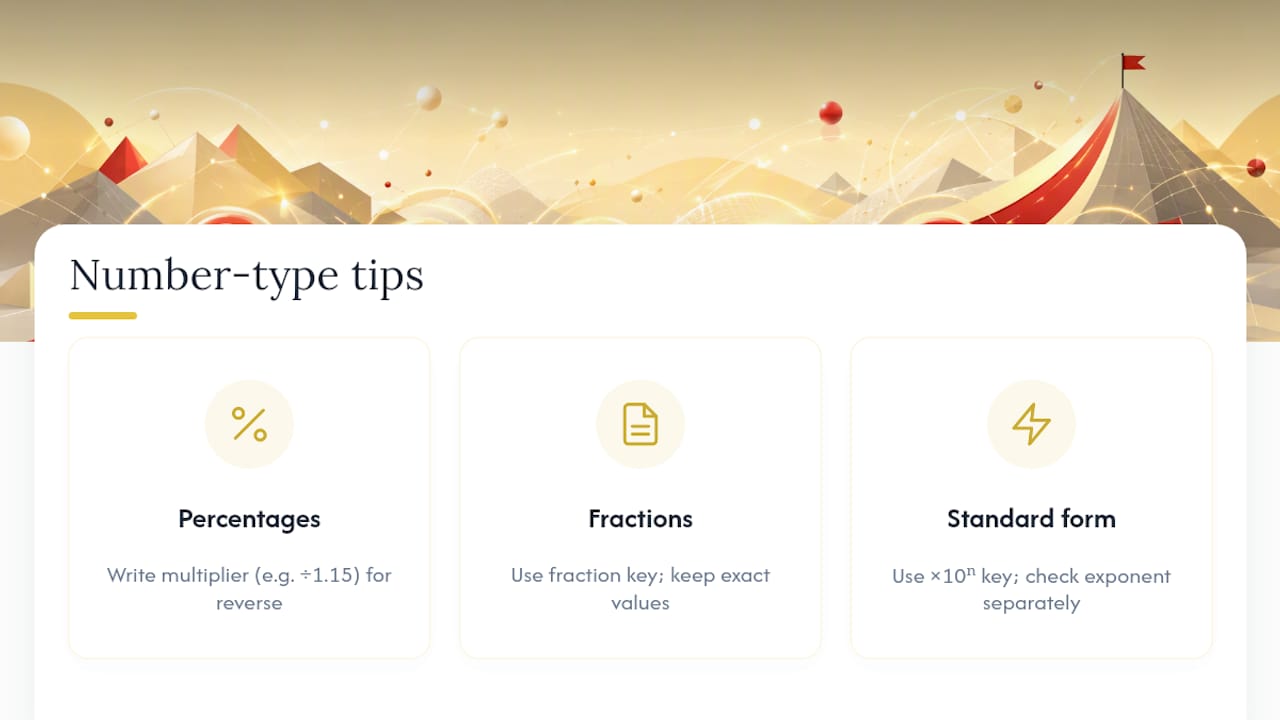
Strategies for handling percentages, fractions, and standard form
These three question types dominate the calculator paper, and each rewards a slightly different habit.
Percentages. Decide immediately whether the question wants a percentage of an amount, a percentage change, or reverse percentages (finding an original value before an increase or decrease). Reverse percentage questions catch students out most often, because the instinct is to simply take a percentage off the given figure rather than dividing by the correct multiplier. Write the multiplier explicitly, for example ÷1.15 for a reverse of a 15% increase, before you calculate.
Fractions. Use your calculator’s fraction key to keep exact values through multi-step working rather than converting to decimals early and compounding rounding errors. If a question asks for an answer as a fraction, don’t convert to a decimal and back again, it’s an unnecessary step that invites mistakes.
Standard form. Enter numbers using the ×10ⁿ key rather than typing out “×10^” manually, since the two don’t always behave identically across calculator models. Always sense-check the power of ten in your answer separately from the digits themselves; a wrong exponent is a completely different kind of error to a wrong digit, and it’s easy to miss if you only glance at the number as a whole.
Across all three, the same discipline applies: estimate the rough size of the answer first, so a misplaced decimal point or wrong exponent stands out immediately rather than sailing through unnoticed.
Techniques for double-checking final answers
Checking a final answer well takes under thirty seconds and it’s one of the highest-value habits on the entire paper.
Start with the estimate you formed before calculating, and compare it directly against what the calculator shows. A answer that’s ten times too big or small usually points to a decimal point or standard form error, not a conceptual mistake. Next, check the format the question specifically asked for: has it asked for one decimal place, a fraction, or a specific unit, and does your answer match that instruction exactly? Losing a mark for giving 3.14159 when the question asked for one decimal place is entirely avoidable.
Where time allows, try a second method to verify a tricky calculation. Reverse the operation (if you divided, try multiplying back to see if you recover the original figure), or substitute your answer back into the original equation to see if it holds. For geometry and trigonometry questions, a rough sketch with approximate proportions often reveals an answer that’s clearly the wrong shape, even without redoing the arithmetic.
Finally, re-read the question itself one more time before moving on. A correct calculation answering the wrong question, for instance, giving the radius when the question asked for the diameter, is a mistake no amount of checking arithmetic will catch.
Tips for using memory and recall functions on the calculator
Memory functions on a Casio-style calculator (M+, M−, and MR or RCL) exist to store a value across several calculations without retyping it, but they cause more harm than good if used carelessly.
The biggest risk is an old memory value left over from a previous question or from revision the night before. Clear all memory registers at the start of the exam using your calculator’s reset or memory-clear function, and get into the habit of doing this every time you sit down to a fresh past paper during revision too.
Ans, distinct from the M+ memory keys, is usually the safer option for carrying a result from one line to the next within the same question, because it automatically updates to your most recent answer rather than requiring you to manually store and recall a value. Reserve M+ and M− for situations where you genuinely need to keep a running total across several separate calculations, such as adding up several partial areas to find a total.
If you do use memory storage, write down the value you’ve stored on your working paper as well. That way, if you accidentally overwrite the memory or lose track of what’s stored, you can retype it rather than losing the calculation entirely. Treat memory functions as a convenience, not a substitute for writing your working down on paper.
Strategies for when calculator use is restricted or not allowed
Not every GCSE maths question, and not every paper, allows a calculator. Paper 1 is entirely non-calculator on most boards, and even within the calculator paper, some short questions are quicker and more reliable done mentally or on paper.
Before reaching for your calculator, ask whether the question actually needs it. A quick decision habit, calculator or mental method, saves time and reduces careless error risk on multi-step questions where typing introduces more risk than it removes. Simple percentage of 10, doubling, halving, and basic fraction simplification are often faster and safer done by hand.
For the non-calculator paper specifically, the skills that transfer are estimation and clean written method, exactly the habits this calculator paper strategy builds. Practising mental methods for percentages, fractions and standard form alongside your calculator drills means you’re not relying on the calculator as a crutch for arithmetic you should be able to do either way.
If you’re ever unsure whether a specific calculator model or function is permitted in an exam, the JCQ’s calculator regulations, which AQA, Edexcel, OCR and WJEC all follow, set out exactly which features (such as symbolic algebra or internet connectivity) are banned. Check this well before exam day, not the morning of the exam.
Common pitfalls specific to calculator functions and how to avoid them
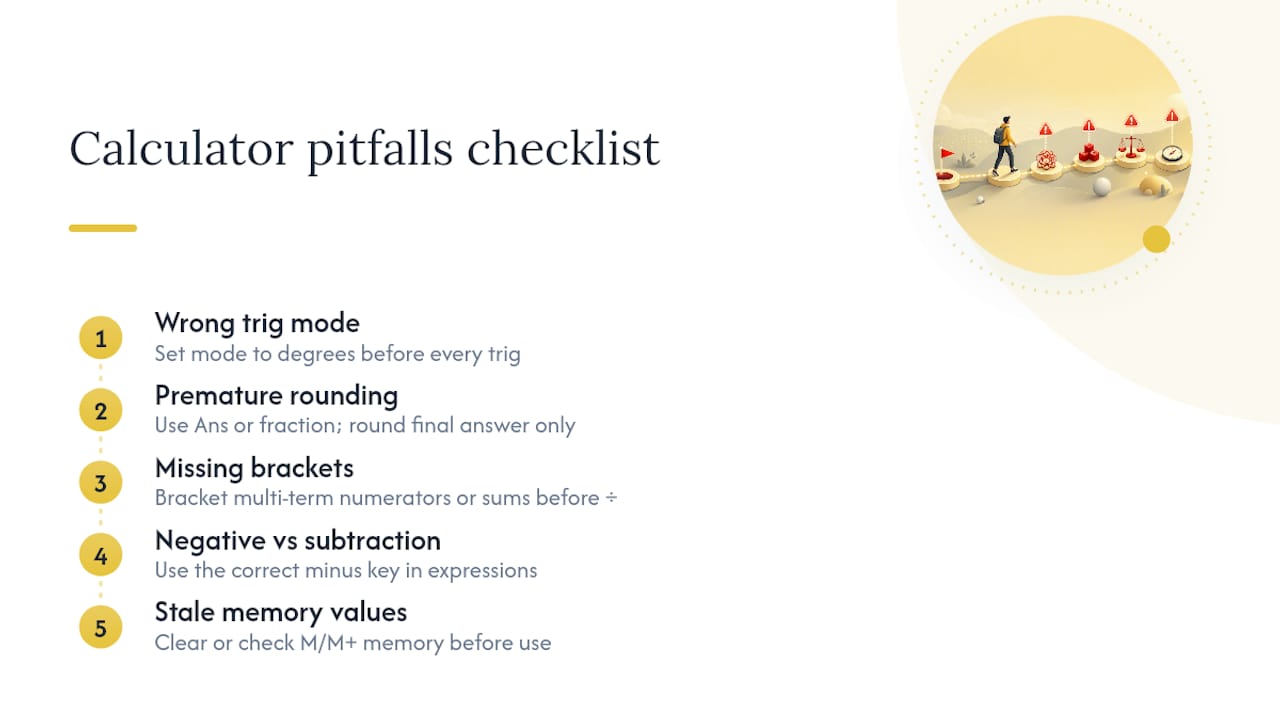
A handful of calculator-specific mistakes account for a disproportionate share of lost marks, and nearly all of them are entirely avoidable with the right habit.
Wrong mode for trigonometry. GCSE exams use degrees, never radians or gradians. Checking your mode before every trig question, not just once at the start of the exam, prevents an entire category of wrong answers.
Premature rounding. Rounding an intermediate result before the final step compounds error through the rest of a multi-step calculation. Carry full calculator precision through every step using Ans or the fraction key, and round only your final answer.
Bracket omission in compound expressions. Forgetting to bracket a multi-term numerator or a sum before dividing is one of the most common entry errors on the calculator paper. When a fraction or expression has more than one term on either side of an operation, bracket it.
Mixing the negative key with the subtraction key. These look similar but behave differently inside a longer expression, and conflating them is a persistent, quiet source of wrong answers.
Stale memory values. An old M+ total from a previous question, left uncleared, silently corrupts a fresh calculation with no obvious warning sign.
Treat each of these as a specific, nameable habit to correct, rather than a vague “be more careful” instruction, and they become far easier to eliminate through targeted practice.
Author perspective: the one habit worth practising daily
The same mistakes repeat across GCSE calculator papers year after year: wrong mode, missing brackets, an Ans key trusted without checking. None of that reflects weak maths ability. It reflects rushed input under pressure. If there’s one habit worth practising daily, it’s the pause before pressing equals, that quick estimate that catches nine out of ten silly errors before they cost a mark. Build that pause into every practice session and it becomes instinct by exam day.
— Oloru
Where to practise: recommended MathVault packs and next steps
Some platforms provide free, board-aligned past papers with fully worked solutions, helping learners understand where errors occurred beyond just a bare mark scheme. Many revision resources offer plenty of questions but limited insight into why method marks are lost.
Start with the Edexcel GCSE past papers organised by topic to drill the question types covered in this article, percentages, fractions, standard form, before moving into full timed sections. Once you’ve sat a complete paper, use the self-mark past papers with worked solutions to mark your own attempt and build the input-error log this strategy depends on. If you’re within a fortnight of the exam, the 48/24/8 last-minute revision plan compresses the practice plan above into a tighter final countdown. Every resource is free to use, with video walkthroughs and live Q&A sessions available if you get stuck on a specific technique.
Sources
- Mastering calculator IGCSE mathematics: tips for success
- Nine ways to revise for the GCSE Calculator paper
- GCSE maths paper 2 (calculator) – exam support
- ACT math calculator strategies that save time and points
FAQ
Is GCSE maths paper 3 the hardest?
Difficulty varies by board and year rather than following a fixed pattern across papers. Many students find the second and third papers slightly harder because they build on content from earlier papers and often include more multi-step problem-solving questions, but no single calculator paper is officially designated the hardest.
How much will £1,000 be worth in 20 years in the UK?
This depends entirely on the interest rate or investment return applied and on inflation over that period, so there’s no single fixed answer. It’s a classic compound interest and reverse percentage style question you’ll practise for the calculator paper, using a formula like A = P(1 + r)ⁿ rather than a real-world prediction.
Is the Casio FX-991EX allowed in GCSE exams?
The Casio fx-991EX is permitted under current JCQ rules followed by AQA, Edexcel, OCR and WJEC, provided it isn’t modified to add banned features like internet connectivity. Always check your specific exam board’s calculator guidance before the exam, since rules can be updated between series.
What is the National Numeracy Strategy in the UK?
The National Numeracy Strategy was an English government initiative aimed at raising numeracy standards in primary schools through structured teaching methods. It predates current GCSE calculator-paper assessment and isn’t directly tied to today’s exam structure, though it shaped the foundational numeracy many current GCSE students built on earlier in school.
What’s the fastest way to improve on the calculator paper?
Combine timed past-paper practice with an input-error log so you can see exactly which button mistakes, rather than genuine gaps in understanding, are costing you marks. Mathvault’s worked solutions and video walkthroughs let you check your method against a board-aligned answer immediately after each timed attempt.
Leave a Reply